

Introduction
We got Proxmox VE 9 running on the Rock 5B, with working KVM virtual machines and LXC containers.
This is a follow-up to our ROCK-5B First Look. Back then we flashed Armbian to an SD card and testet a few things. This time we wanted to know if it can be a small, low-power hypervisor.
Proxmox recently announced Arm64 support but currently only NVIDIA Grace and Vera platforms are supported. We used PXVIRT, a community port of Proxmox VE for ARM64 since there appears to be an active community around it. Below are the steps we took and every pitfall we hit on the way.
Hardware and Software
| Part | What we used |
|---|---|
| Board | Radxa Rock 5B, RK3588, 16 GB RAM |
| CPU | 4x Cortex-A76 (2.3 GHz) + 4x Cortex-A55 (1.8 GHz) |
| Storage | Crucial P3 500 GB NVMe in the M.2 slot |
| Network | Onboard 2.5 GbE (Realtek RTL8125B) |
| Power | USB-C PD power supply, 30 W or more |
| Base OS | Armbian 26.8 (Debian 13 Trixie), vendor kernel 6.1 |
| Hypervisor | PXVIRT: Proxmox VE 9.0 (pve-manager 9.0.10, QEMU 10.0) |
PXVIRT is installed as an apt repository on top of a Debian system. That is why we start with Armbian and not with an ISO installer.
Use the Debian flavour of Armbian, not Ubuntu. Debian 12 Bookworm matches Proxmox VE 8, Debian 13 Trixie matches Proxmox VE 9.
Under load the RK3588 throttles without a heatsink, so plan a fan for a hypervisor that runs 24/7.
Step 1: Armbian on NVMe and the SPI Bootloader
The Rock 5B can boot from NVMe, but only if the SPI flash holds a bootloader that supports it. Ours did not.
The RK3588 boot ROM only looks at SPI flash, eMMC and SD card. It cannot read NVMe on its own. A U-Boot in the SPI flash has to load the system from the NVMe.
We flashed the Armbian image straight to the NVMe with a USB adapter (Raspberry Pi Imager, “Use custom” works fine with the .img.xz). The board did not boot:
- The blue status LED stayed solid instead of blinking (Armbian sets it to heartbeat once the kernel runs).
- The switch showed the port as FE (100 Mbit/s) instead of 2.5G, because Linux never loaded the network driver.
The SPI flash still held an older Radxa loader that did not boot our NVMe. The fix was a short detour over an SD card:
- Flash the same Armbian image to a microSD card and boot from it.
- Log in as
rootwith password1234. The first-login wizard asks for a new password and creates a user. - Back up the old SPI content and write the Armbian SPI loader:
dd if=/dev/mtdblock0 of=/root/spi-backup.img bs=1M
F=$(ls /usr/lib/linux-u-boot-*/rkspi_loader.img)
dd if=$F of=/dev/mtdblock0 conv=notrunc,fsync
cmp -n $(stat -c %s $F) $F /dev/mtdblock0
armbian-install offers the same as a menu entry. After a shutdown we removed the SD card, and the board booted from the NVMe.
One trap: the SD card and the NVMe came from the same image, so their root partitions share a UUID. With both inserted, it is luck which one becomes /. Remove the SD card once the SPI loader is in place.
Step 2: Check KVM, then Install PXVIRT
KVM worked out of the box on the Rock 5B, even with the Rockchip vendor kernel 6.1. Check this before anything else, without /dev/kvm you only get containers:
ls -l /dev/kvm
dmesg | grep -i kvm   # look for "VHE mode initialized successfully"
Proxmox needs the hostname to resolve to the real IP, not to 127.0.1.1. We also removed the hostname from the ::1 line in /etc/hosts:
192.168.50.35 rock-5b.local rock-5bThen add the PXVIRT repository and key. The PXVIRT docs only show Bookworm, but the mirror also has a trixie branch with arm64 packages:
curl -fsSL https://mirrors.lierfang.com/pxcloud/lierfang.gpg \
  -o /etc/apt/trusted.gpg.d/lierfang.gpg
echo "deb https://mirrors.lierfang.com/pxcloud/pxvirt trixie main" \
  > /etc/apt/sources.list.d/pxvirt-sources.list
apt update
apt install ifupdown2 proxmox-ve pve-manager qemu-server pve-cluster
The package is called proxmox-ve, there is no pxvirt package. Good news: it does not pull in its own kernel, so the vendor kernel with working KVM stays.
Two things slowed us down:
- Our network has no IPv6 route, but apt kept trying IPv6 mirrors.
Acquire::ForceIPv4 "true";in/etc/apt/apt.conf.d/fixed it. - The mirror sits behind Cloudflare and refused connections for a few minutes. A second
apt installwent through at full speed.
Postfix asks for a mail setup during the install, “Local only” is fine.
Step 3: Network Bridge
VMs need a bridge, so we moved the network from Armbian’s netplan/systemd-networkd to ifupdown2 with vmbr0. This is the step where you can lock yourself out, so keep a monitor and keyboard nearby.
/etc/network/interfaces:
auto lo
iface lo inet loopback

iface enP4p65s0 inet manual

auto vmbr0
iface vmbr0 inet static
	address 192.168.50.35/24
	gateway 192.168.50.1
	bridge-ports enP4p65s0
	bridge-stp off
	bridge-fd 0

source /etc/network/interfaces.d/*
Then turn off the Armbian network stack and write a static /etc/resolv.conf with your DNS servers:
mv /etc/netplan/10-dhcp-all-interfaces.yaml /root/
systemctl disable systemd-networkd.service systemd-networkd.socket systemd-resolved
rm /etc/resolv.conf   # was a symlink to the systemd-resolved stub
systemctl enable networking
reboot
ifupdown2 may print “Another instance of this program is already running” before the reboot. In our case it was harmless: /run/network did not exist yet.
After the reboot vmbr0 had the IP and the web UI answered on https://<ip>:8006 (user root, realm Linux PAM). Give the address a DHCP reservation in your router so it is never handed out twice.
Step 4: The First VM and the ARM Pitfalls
Our first VM was Rocky Linux 10.2 aarch64. It took two errors until it booted, both specific to ARM.
A working VM uses machine type virt, BIOS OVMF (UEFI), CPU type host, an aarch64 ISO, and these two settings:
1. Pin the VM to one core type. The first start failed with:
kvm: Failed to put registers after init: Invalid argumentThe RK3588 is a big.LITTLE chip with two different core types:
| Cortex-A76 (cores 4-7) | Cortex-A55 (cores 0-3) | |
|---|---|---|
| Clock | up to 2.3 GHz | up to 1.8 GHz |
| Design | out-of-order | in-order |
| L2 cache per core | 512 KB | 128 KB |
| Use for | VMs that need performance | small services, low power |
With CPU type host a VM takes on the features of the core it starts on. If its vCPUs land on both types, KVM rejects the registers. The fix is CPU affinity under Hardware → Processors → Advanced:
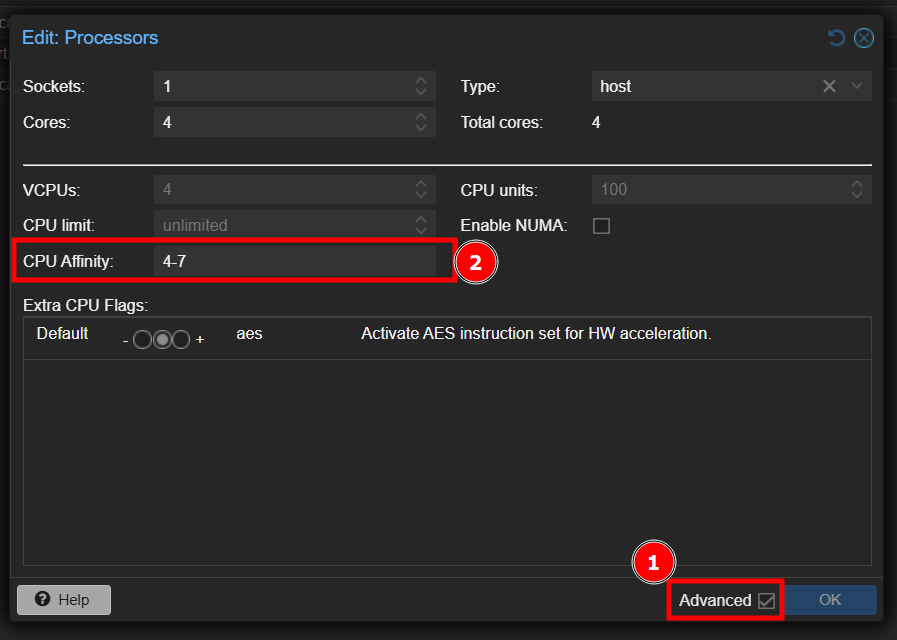
or via cli:
qm set 100 --affinity 4-7Every new VM and every clone needs this. LXC containers are not affected.
2. Use SCSI, never IDE. Adding a cloud-init drive gave:
kvm: -device ide-cd,bus=ide.0,unit=0,drive=drive-ide0,id=ide0: Bus 'ide.0' not foundThe ARM virt machine has no IDE controller, but the Proxmox UI suggests IDE for cloud-init and CD drives. Put them on SCSI:
qm set 100 --delete ide0
qm set 100 --scsi1 local:cloudinit
Note that cloud-init only does something with a cloud image (e.g. Rocky GenericCloud aarch64 qcow2), not with the normal installer ISO.
Limitations
As a single node it works well, but it is not a drop-in member for an x86 Proxmox setup.
- No watchdog:
watchdog-muxfails at boot. The vendor kernel has nosoftdog, and the hardware watchdog is disabled in the Rock 5B device tree. This only matters for HA. - No mixing with x86 clusters: joining is technically possible, but VMs and containers cannot migrate between ARM and x86. PXVIRT also trails the official Proxmox releases, so versions in the cluster would drift apart. We keep the board standalone. Proxmox Datacenter Manager can show it next to the x86 nodes.
- ARM guests only: every VM needs an aarch64 ISO or image, and LXC needs arm64 templates.
- Repository warning: the Proxmox UI flags the
armbian-configrepo because its suite is calledstable. That repo only hasstable, so the warning can be ignored.
Conclusion
The Rock 5B makes a usable little Proxmox host: 8 cores, 16 GB RAM, NVMe and 2.5 GbE, with real KVM VMs.
Most of the work was not Proxmox itself but the board around it: the SPI bootloader, the network switch to ifupdown2, and the ARM quirks of big.LITTLE and the missing IDE bus. Once you know them, a new VM takes a few clicks.
Next we want to build a Rocky cloud-image template with the right affinity, and see how the board holds up with several VMs running around the clock.
Sources
- ROCK-5B First Look (our first post)
- PXVIRT on GitHub
- PXVIRT: Install from Debian
- PXVIRT: Rockchip notes
- PXVIRT repository mirrors
Special Thanks
Special thanks to RS Components, who provided us with the Rock 5B free of charge some time ago. Without them this project would not have been possible.
AI-Disclosure
This project was done together with Claude, an AI assistant by Anthropic. Claude helped with the setup and helped with debuggeing the errors.
The text of this post was also drafted by Claude and then reviewed and edited by us. The hardware, the decisions and the testing are ours.
[…] Proxmox (Lierfang) on the Rock 5B Views: 228 ← Previous PostNext Post → Subscribe Login Notify of new follow-up comments new replies to my comments […]